Standard Work: MIL-STD-129 Military Label Printing
Trabajo Estándar: Proceso de Impresión de Etiquetas Militares MIL-STD-129
Initial Setup & Prerequisites
Configuración Inicial y Prerrequisitos
English: This process begins in the SAP transaction ZSD_MILLABELS. Before you can print any labels, you must create a delivery using transaction VL01N.
Español: Este proceso comienza en la transacción de SAP ZSD_MILLABELS. Antes de poder imprimir cualquier etiqueta, debes crear una entrega usando la transacción VL01N.
English: Once in the label transaction, enter the Delivery Number you just created. The Delivery Item will always be 10. Press Enter to continue.
Español: Una vez en la transacción de etiquetas, introduce el Número de Entrega que acabas de crear. El Ítem de Entrega siempre será 10. Presiona Enter para continuar.
Step 1: Unit Label
Paso 1: Etiqueta de Unidad
English: Navigate to the Unit tab to print the internal labels for the unit itself.
Español: Navega a la pestaña Unit para imprimir las etiquetas internas para la unidad.
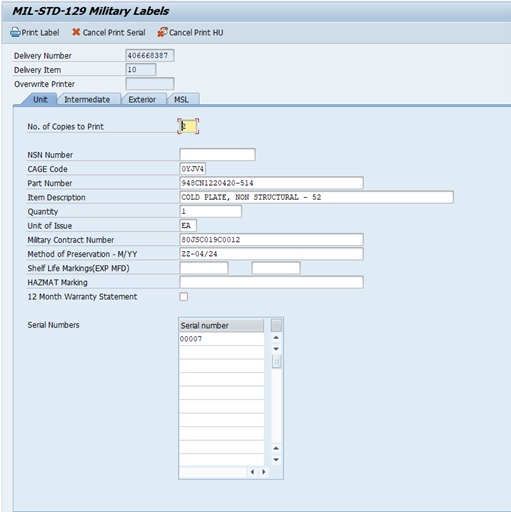
English Explanation: The image above shows the 'Unit' tab. You can see fields like 'CAGE Code', 'Part Number', and 'Quantity' ready to be filled.
Explicación en Español: La imagen de arriba muestra la pestaña 'Unit'. Puedes ver campos como 'CAGE Code', 'Part Number' y 'Quantity' listos para ser llenados.
Fields to complete:
- No. of Copies to Print: Enter 3.
- CAGE Code: Fill this in.
- Part Number: Enter the customer's part number.
- Quantity: Enter 1.
- Method of Preservation: Use the format "ZZ-MM/YY".
English: After filling in the fields, click the "Print Label" button.
Español: Después de llenar los campos, haz clic en el botón "Print Label".
English: These labels will print from the printer located in Metrology.
Español: Estas etiquetas se imprimirán desde la impresora ubicada en Metrología.
Step 2: Exterior Label
Paso 2: Etiqueta Exterior
English: Navigate to the Exterior tab to print the labels for the outside of the shipping container.
Español: Navega a la pestaña Exterior para imprimir las etiquetas para el exterior del contenedor de envío.
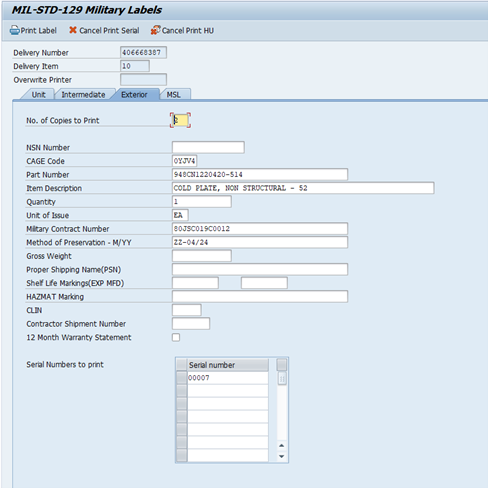
English Explanation: This screen is for the 'Exterior' label, including fields like 'Gross Weight'.
Explicación en Español: Esta pantalla es para la etiqueta 'Exterior', e incluye campos como 'Gross Weight' (Peso Bruto).
Fields to complete:
- No. of Copies to Print: Enter 2.
- Part Number: Enter the customer's part number.
- Quantity Shipping: Enter the total quantity being shipped.
- Method of Preservation: Use the format "ZZ-MM/YY".
- Gross Weight: Fill in the weight from the OP book.
English: In the serial number section, highlight the serial number and then click the "Print Label" button.
Español: En la sección de números de serie, resalta el número de serie y luego haz clic en el botón "Print Label".
English: For serialized parts, a second label containing only the serial number will print automatically. Both labels are required. These labels will print from the printer located in RI.
Español: Para piezas serializadas, se imprimirá automáticamente una segunda etiqueta que contiene solo el número de serie. Ambas etiquetas son requeridas. Estas etiquetas se imprimirán desde la impresora ubicada en RI.
Step 3: Military Shipment Label (MSL)
Paso 3: Etiqueta de Envío Militar (MSL)
English: Navigate to the MSL tab. Important: The shipping department must process the shipment and create a handling unit before this step can be completed.
Español: Navega a la pestaña MSL. Importante: El departamento de envíos debe procesar el embarque y crear una unidad de manejo antes de que este paso pueda ser completado.
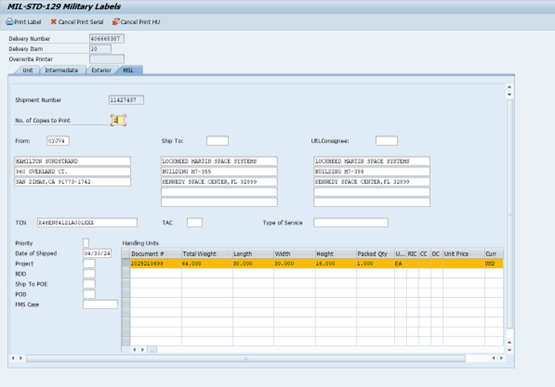
English Explanation: This is the 'MSL' tab. The key fields here are 'TCN' and the 'Handling Units' table.
Explicación en Español: Esta es la pestaña 'MSL'. Los campos clave son 'TCN' y la tabla de 'Handling Units' (Unidades de Manejo).
Fields to complete:
- No. of Copies to Print: Enter 2.
- From: Enter the CAGE Code in this field.
- TCN: Enter the Transportation Control Number.
- Date Shipped: Corresponds to the Julian date in the TCN.
English: In the Handling Units table, highlight the handling units line and click the "Print Label" button.
Español: En la tabla de Unidades de Manejo, resalta la línea de la unidad de manejo y haz clic en el botón "Print Label".
English: These labels will print from the printer located in RI.
Español: Estas etiquetas se imprimirán desde la impresora ubicada en RI.
Method of Preservation
Método de Preservación
English: This field records how and when an item was packaged. The required format is "ZZ-MM/YY".
Español: Este campo registra cómo y cuándo se empacó un artículo. El formato requerido es "ZZ-MM/YY".
Format Breakdown:
- ZZ:
English: A general code for "Special Preservation" or "Commercial Packaging."
Español: Un código general para "Preservación Especial" o "Empaque Comercial".
- MM/YY:
English: The two-digit month and two-digit year of preservation.
Español: El mes y el año de la preservación, ambos en dos dígitos.
Example: September 19, 2025
You would enter: ZZ-09/25
Cómo Construir un Transportation Control Number (TCN)
How to Build a Transportation Control Number (TCN)
El TCN es un identificador único de 17 caracteres crucial para el rastreo de envíos militares. Cuando no es proporcionado por el gobierno, debes crearlo siguiendo una estructura estricta.
The TCN is a unique 17-character identifier crucial for tracking military shipments. When not provided by the government, you must create it following a strict structure.
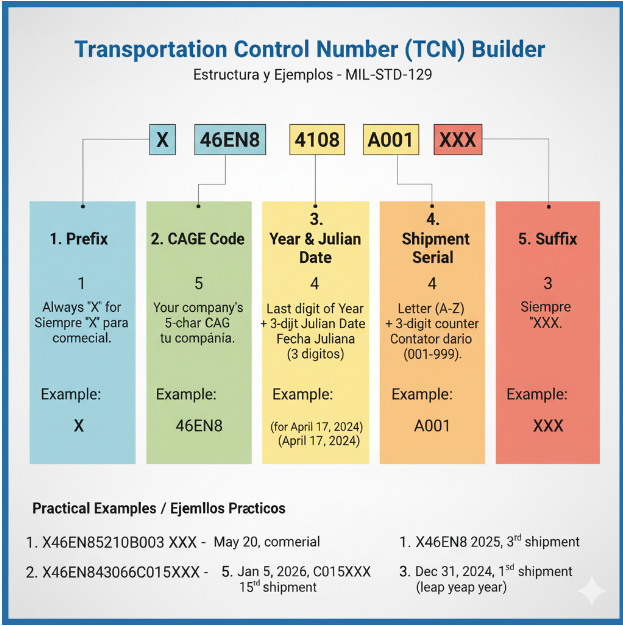
Explicación: Esta infografía muestra los 5 componentes del TCN y la cantidad de caracteres de cada uno, con ejemplos.
Explanation: This infographic shows the 5 components of the TCN and the number of characters for each, with examples.
Desglose de la Estructura (Structure Breakdown):
| Componente | Caracteres | Ejemplo | Descripción (Español/English) |
|---|---|---|---|
| 1. Prefijo (Prefix) | 1 | X | Siempre 'X' para indicar un remitente comercial (no un DODAAC militar). Always 'X' to signify a commercial shipper (not a military DODAAC). |
| 2. Código CAGE (CAGE Code) | 5 | 46EN8 | El código CAGE de 5 caracteres de tu compañía. Your company's 5-character CAGE code. |
| 3. Año y Fecha Juliana (Year & Julian Date) | 4 | 4108 | Último dígito del año ('4' para 2024) y la fecha Juliana de 3 dígitos ('108' para el 17 de abril). Last digit of the year ('4' for 2024) and the 3-digit Julian date ('108' for April 17). |
| 4. Serie de Envío (Shipment Serial) | 4 | A001 | Una letra (A-Z, se incrementa al agotar los números) más un contador de envíos del día de 3 dígitos (001-999). A letter (A-Z, increments when numbers run out) plus a 3-digit daily shipment counter (001-999). |
| 5. Sufijo (Suffix) | 3 | XXX | Siempre termina con 'XXX'. Always ends with 'XXX'. |
Ejemplos Prácticos (Practical Examples):
Ejemplo 1: Primer envío el 20 de mayo de 2025
Datos: CAGE Code: 46EN8, Fecha: 20 de mayo de 2025 (Día Juliano: 140), Primer envío del día.
X + 46EN8 + 5 + 140 + A001 + XXX
TCN Resultante: X46EN85140A001XXX
Ejemplo 2: Segundo envío el 5 de enero de 2026
Datos: CAGE Code: 46EN8, Fecha: 5 de enero de 2026 (Día Juliano: 005), Segundo envío del día.
X + 46EN8 + 6 + 005 + A002 + XXX
TCN Resultante: X46EN86005A002XXX
Ejemplo 3: Décimo envío el 31 de diciembre de 2024 (Año Bisiesto)
Datos: CAGE Code: 46EN8, Fecha: 31 de diciembre de 2024 (Día Juliano: 366), Décimo envío del día.
X + 46EN8 + 4 + 366 + A010 + XXX
TCN Resultante: X46EN84366A010XXX
Análisis Detallado de la Fecha Juliana en Logística
En este contexto, la **"fecha juliana"** es simplemente el **día del año**, representado por un número de tres dígitos (001 a 366). Se utiliza para eliminar la ambigüedad de los formatos de fecha y simplificar cálculos.
Ejemplo: 17 de Abril de 2024
Enero (31) + Febrero (29) + Marzo (31) + Abril (17) = 108.
Calculadora de Fecha Juliana
Aquí aparecerá el resultado...